Archie Mac Notch Screenshot Manager Organizes Captures For Nine Dollars
New Mac Utility Turns Controversial Notch Into Screenshot Hub
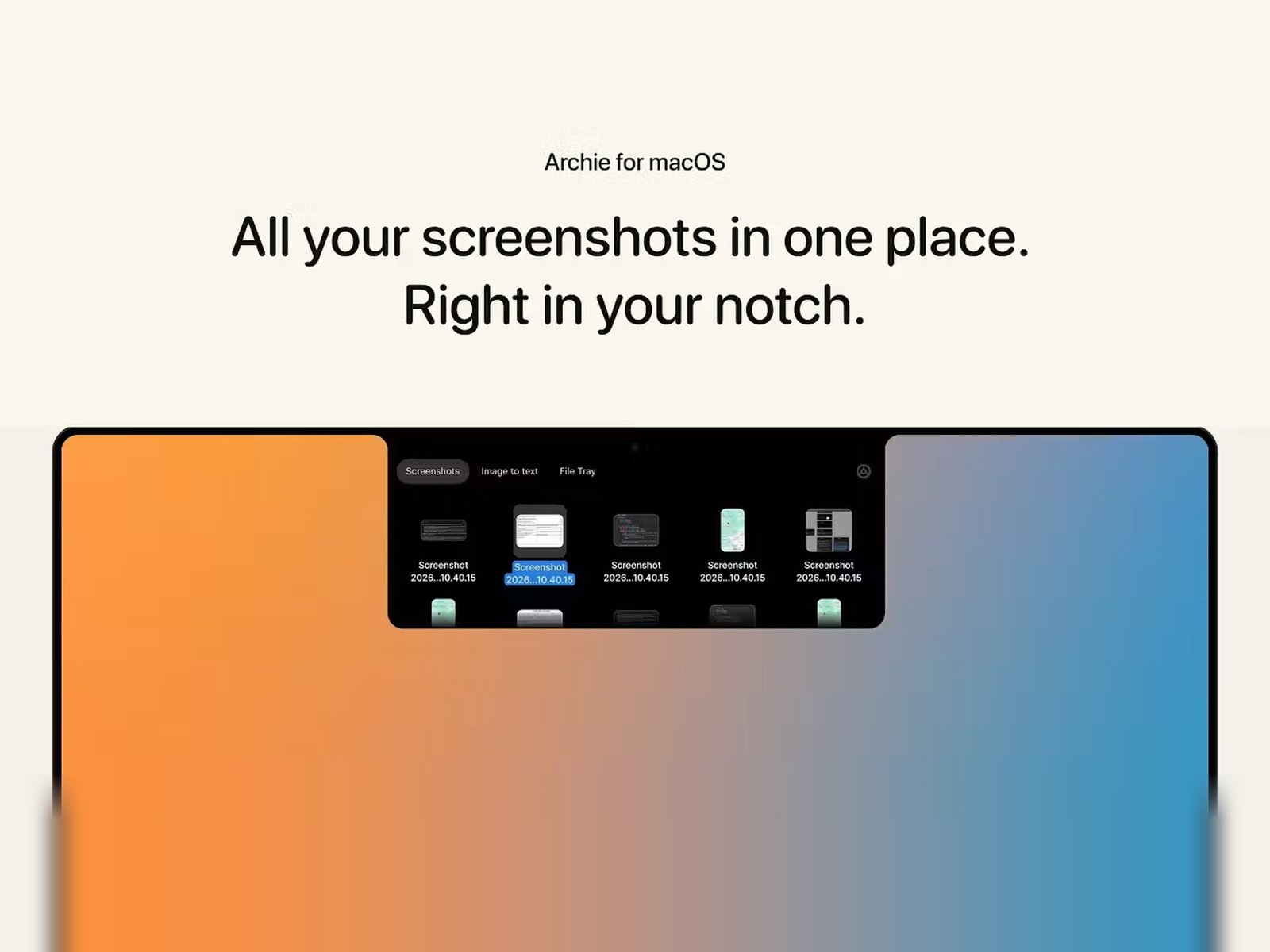
MacBook Pro M3 and MacBook Air M2 owners who capture screens daily now have a clever solution that transforms Apple’s divisive display cutout into functional workspace. Archie, a freshly launched macOS application, places recent captures directly inside the notch area for instant access without cluttering desktop space or requiring separate window management.
How Archie Works With MacBook Display Hardware
The utility integrates seamlessly with macOS Sonoma and later versions on MacBook Pro 14-inch M3 Pro, MacBook Pro 16-inch M3 Max, and MacBook Air 15-inch M2 models. When users press standard capture shortcuts — Command-Shift-3 for full screen or Command-Shift-4 for selection — Archie automatically stores the resulting image in a compact tray accessible by clicking the notch region. This approach eliminates the floating thumbnail preview that typically appears in the corner and disappears after several seconds.
Built-In Editing And Text Recognition Features
Beyond simple storage, the application includes annotation tools for adding arrows, rectangles, text callouts, and blur effects before sharing. Local optical character recognition extracts text from captures without uploading data to external servers, preserving privacy for sensitive documents. The OCR engine supports English, Spanish, French, German, Italian, Portuguese, Dutch, Polish, Russian, Chinese, Japanese, and Korean languages across all supported MacBook configurations.
Privacy Controls And Automatic Cleanup
Archie addresses common security concerns with automatic expiration rules. Users configure retention periods ranging from one hour to thirty days, after which captures self-delete unless manually pinned. A secure vault option encrypts selected screenshots with AES-256 encryption, requiring Touch ID or Face ID authentication on compatible MacBook Pro M3 and MacBook Air M2 devices. The developer emphasizes zero telemetry collection and no network connections unless explicitly enabled for cloud sync.
Drag-And-Drop Integration Across Applications
Captures drag directly from the notch tray into Mail, Messages, Slack, Notion, Figma, Xcode, and any application accepting image input. This workflow eliminates intermediate save steps when inserting screenshots into bug reports, design reviews, or documentation. The tray also supports batch selection for moving multiple captures simultaneously.
Pricing And Availability Details
Archie launches today on the developer’s website for a single $9.99 lifetime license with no subscription requirement. The purchase includes all future updates and supports installation on up to three personal Mac devices. A seven-day trial provides full functionality without payment details. The utility requires macOS 14 Sonoma or later and Apple Silicon processors — Intel-based MacBook Pro 2019 and earlier models are unsupported.
Early User Feedback And Development Roadmap
Beta testers report the notch integration feels natural after brief adjustment, particularly on MacBook Pro 14-inch M3 where screen real estate is precious. The development team plans iCloud sync for cross-device access, custom keyboard shortcuts for specific capture types, and plugin architecture for third-party extensions later this year. Archie represents a rare utility that repurposes Apple’s hardware design choice into genuine productivity enhancement rather than novelty.